Supercharge Your Email Marketing with Mailtrack Chrome Extension
The Importance of Browser Extensions
Browser extensions, such as the ones available for Google Chrome, are invaluable tools that enhance the functionality of your web browsing experience. They can provide additional features, streamline tasks, and customize the user interface to make it more efficient and user-friendly.
Introducing Mailtrack
One such extension is Mailtrack, a powerful tool for Gmail users. Mailtrack is an email tracker that allows you to monitor your emails, knowing when they've been opened and read. It's a useful extension for anyone who wants to boost their outreach and email marketing efforts.
Main Goals of Mailtrack
Mailtrack aims to provide users with a comprehensive tracking service that is both free and unlimited. Some of the extension's key features include:
- Free email tracking for Gmail
- Security audit by Google
- GDPR compliant
- Patented Technology
- Highly-rated by users: 4.5 stars from over 10,000 reviews
- Featured in Forbes, Mashable, Inc, Lifehacker…
- Used by professionals in: Uber, Indeed, Randstad, Keller Williams, Compass..
Mailtrack also provides users with a personal email marketing tool. This includes the ability to send campaigns with Mail Merge and PDF document tracking from Gmail.
How to Use Mailtrack
- Install the Mailtrack extension
- Send emails as normal. Mailtrack will automatically track all your sent emails.
- Open your 'Sent emails' folder to see the tracking status of each email.
- A single checkmark indicates that your email has been sent, but not yet opened.
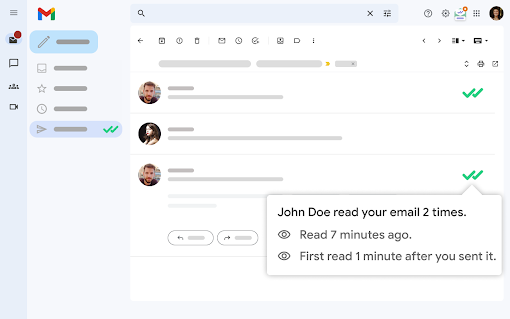
- Two checkmarks mean that your email has been opened. You can hover your mouse over the checkmarks to see exactly when and how many times your email has been opened.
Benefits and Features of Mailtrack
Mailtrack offers a range of benefits and features that make it stand out from other email tracking tools. These include:
- Higher open rates and response rates
- Improved deliverability, with fewer emails ending up in spam or promotions folders
- Follow-up alerts for easy tracking
- Connection with Google Sheets for Mail Merge
- Bulk email features for email marketing and Gmail templates
- Email and phone support
When to Use Mailtrack
There are many situations where Mailtrack can be useful. These include:
- Job searching: Know when your resume has been opened by recruiters
- Sending quotes: Monitor engagement with potential clients
- Sending invoices: Confirm whether your bill has been received or not
- Email marketing: Measure the effectiveness of your cold emails
Privacy, Safety, and Audit
Mailtrack takes privacy and safety seriously. It operates in accordance with the European Regulation (EU) 2016/679 of the European Parliament and of the Council of 27 April 2016. In addition, Mailtrack is fully GDPR compliant and passes an annual security audit by Google.
Installation and Setup
Guide on how to install the extension
To begin using the Mailtrack extension, follow these steps:
- Go to the Chrome Web Store and search for 'Email Tracker for Gmail, Mailsuite-Mailtrack'
- Click on the 'Add to Chrome' button to install the Mailtrack extension
- Once installed, the Mailtrack icon will appear in your browser bar
- Click on the icon and sign in with your Gmail account to activate the tracking feature
Notable settings during the setup process
During the initial setup, you can customize your notification settings. You can choose to be notified when your emails are read, have not been opened, or have been opened multiple times. You can also choose to track links within your emails.
Mailtrack is compatible with various devices and platforms. It works seamlessly with the Gmail app on both iOS and Android devices. Additionally, it integrates with Salesforce and other CRM platforms. Mailtrack also offers email and phone support for users who need assistance or have inquiries.
Key Features of Mailtrack
Feature 1: Free and Unlimited Email Tracking
Mailtrack offers a free and unlimited email tracking feature that allows you to track as many emails as you like. This enhances the user experience by providing continuous real-time updates of your sent emails.
Feature 2: Individual Email Tracking for Group Emails
With individual email tracking for group emails, Mailtrack takes the guesswork out of knowing exactly who opened your email. This feature enhances user experience by providing detailed insights into who is engaging with your content.
Feature 3: Follow-up Email Alerts
Mailtrack's follow-up email alerts notify you when your email has not been opened, replied to, or opened multiple times. This allows you to execute timely follow-ups and increases your chances of getting a response.
Feature 4: Link and Document Tracking
Mailtrack also offers link tracking and PDF tracking features. This means you can know when someone clicks on the links in your emails and when your PDF documents are opened. This feature gives you a deeper understanding of how your recipients are interacting with your content.
Feature 5: Campaigns and Mail Merge
With Mailtrack's Campaigns and Mail Merge features, you can send individually tracked emails to up to 1,000 recipients at a time. These features enhance user experience by enabling mass email tracking and customization, using data from Google Sheets.
Enhancing Browsing Experience with Mailtrack
Mailtrack enhances the browsing experience by providing a comprehensive suite of email tracking tools. It allows users to know when their emails have been sent, opened, and interacted with, eliminating the uncertainty that often comes with email communication.
Furthermore, with its integration capabilities, it allows users to connect their email tracking with their CRM systems, thereby streamlining their sales and marketing processes. This integration also allows for data export with Mail Merge to CSV files, thereby further enhancing the user experience.
Finally, it's worth noting that Mailtrack's commitment to privacy and safety is paramount. It is fully GDPR compliant and undergoes an annual security audit by Google, providing users with the peace of mind that their data is safe and secure.
Security and Privacy
Extension's Security Analysis
My security analysis has ranks for manifest.json, content script, permissions and host permissions. Rank is from 0 to 10. The higher the rank is, the higher impact on security it has. The same is true for permissions weight:
- Manifest.json rank: 9
- Content script rank: 0
- Permissions rank: 10
- Host permissions rank: 0
The extension requires notification permissions, which has a weight of 4.
Potential Security Concerns or Vulnerabilities
The extension description on the Chrome Web Store provides a detailed overview of its features and capabilities. However, it's important to be aware of potential security concerns. A rank of 10 for permissions indicates that the extension has significant access to browser resources, which could pose a potential vulnerability if misused.
Requested Permissions and Their Impact on Security
The extension requests notification permissions. This is significant as it allows the extension to display notifications to the user, which could potentially be used to display unwanted or intrusive content. However, in this case, the permission is used to notify the user about email tracking status.
Privacy, Safety and Audit
Mailtrack processes personal data in accordance with European Regulation (EU) 2016/679 of the European Parliament and of the Council of 27 April 2016. Their Privacy Policy and Terms of Use are fully compliant with GDPR, which is the toughest privacy and security law in the world.
Additionally, Mailtrack passes an audit by Google every year for optimal security. This increases user trust and ensures the extension conforms to Google's high security standards.
User Reviews and Ratings
User reviews on the Chrome Web Store
It's always a good idea to check user reviews when considering a new browser extension. Below are some reviews from real users on the Chrome Web Store.
Common user feedback and experiences
The user feedback for the Mailtrack extension on the Chrome Web Store shows a variety of experiences. Users who rated the extension lower commonly cited issues with bugs, poor deliverability, and lack of support. Some users reported issues with the dashboard not loading, a problem that persisted for several days.
On the other hand, users who gave higher ratings praised the extension for its easy-to-use design, efficient functionality, and reliable tracking features. They also mentioned the benefits of a speedy customer support system and found value in the email tracking aspect of the tool.
Positive and negative reviews
Criticism of the Mailtrack extension seems to center around technical problems and inadequate customer support. These issues seem to have negatively affected the user experience, leading to lower ratings. However, it's important to note that not all users have encountered these problems. Some users reported a smooth, trouble-free experience with the extension.
Positive reviews highlight the ease of use, functionality, and reliability of the extension. Users appreciated the tool's ability to track emails effectively and found it useful for their sales and marketing needs.
Overall, while there are some negative reviews, there are also many positive reviews. This suggests that the extension could be a valuable tool for many users, as long as the reported technical issues are addressed.
Extension Description
The Mailtrack extension is described as a free and unlimited tracking tool for Gmail. It is also marketed as a personal email marketing tool that includes features such as Campaigns, Mail Merge, and PDF document tracking. With over 2 million active users and 108,000 paying subscribers, it is a popular tool for many Gmail users. The extension has undergone a security audit by Google and is GDPR compliant.
Comparisons with Similar Extensions
Email Tracker for Gmail, Mailsuite-Mailtrack and Streak Email Tracking for Gmail are both powerful extensions enabling email tracking. However, there are key differences. Streak offers a browser or email notification when your email is opened and allows you to schedule tracked emails. On the other hand, Mailtrack offers free unlimited tracking and boasts 2 million active users, which shows a higher user trust level. Additionally, Mailtrack is security audited by Google, thus reassuring users of its safety.
Free Email Tracker by cloudHQ and Mailtrack both provide useful features for email tracking. However, Mailtrack stands out as it is GDPR compliant and uses patented technology. Unlike CloudHQ that provides an upgrade for tracked emails exporting to Google Sheets, Mailtrack offers this feature and many others for free, such as tracking PDF documents, Mail Merge, and integration with Salesforce/CRM.
Mailtrack vs MailTracker: Email Tracker for Gmail
Both Mailtrack and MailTracker: Email Tracker for Gmail offer email tracking solutions. However, Mailtrack differentiates itself with its higher user base and security audits conducted by Google, indicating a dependable service. Additionally, Mailtrack offers Salesforce/CRM integration, a feature not provided by MailTracker. Furthermore, while MailTracker offers a free plan with limited tracking, Mailtrack provides unlimited free tracking.
Key Differentiators and Unique Selling Points
- Security: Mailtrack undergoes a security audit by Google every year, ensuring the safety of your data.
- Unlimited free tracking: Unlike some competitors, Mailtrack provides unlimited free email tracking.
- GDPR Compliance: Ensuring user data privacy and security, Mailtrack complies fully with GDPR, the world's toughest privacy and security law.
- Patented Technology: Mailtrack utilizes patented technology, offering a unique and innovative approach to email tracking.
- High user base: Mailtrack boasts 2 million active users and 108,000 paying subscribers, evidencing user trust in the service.
Recommendations
Based on the comparisons, if you seek a secure, reliable, and feature-rich email tracking solution, Mailtrack would be the recommended choice. Its security audit by Google, GDPR compliance, patented technology, and high user base make it stand out among its competitors. Moreover, its offer of unlimited free email tracking adds to its appeal.
Conclusion
Overall strengths and weaknesses of the extension
Mailtrack offers a robust solution for tracking emails with numerous strengths. It boasts a large user base, a clear indicator of its reliability and effectiveness. Its patented technology and compliance with GDPR regulations add a layer of trust and security, while positive user reviews demonstrate customer satisfaction. With its ability to track group emails individually, link tracking capabilities, and integration features, it offers a comprehensive email tracking solution. However, one potential drawback is that the free version may include the Mailtrack signature in your emails, which some users might find unprofessional or intrusive.
Final verdict on whether the extension is worth trying
In conclusion, Mailtrack is a worthwhile email tracking extension to consider for individuals and businesses alike, particularly for those who regularly send emails in bulk and want insights into email engagement. Its strengths significantly outweigh its minor weaknesses, making it a powerful tool for email tracking.
Additional tips or recommendations for users
- Maximize use of Mailtrack's Features: Users should take full advantage of Mailtrack's features such as link tracking and individual tracking of group emails for comprehensive insights.
- Explore Mailtrack's Integrations: Integrating Mailtrack with other applications like Salesforce or Google Sheets can streamline operations and enhance productivity.
- Consider Upgrading: Users who find the Mailtrack signature intrusive might want to consider upgrading to a premium plan to remove it.
The above tips will help users to more effectively use Mailtrack and reap the benefits of this powerful email tracking extension.



















30 Reviews For This Extension
This extension is very helpful and let you know whether you mail has been opened and let you know when receivers are active online. I love it
You know when you send an important e-Mail to someone, and get no answer? So you start thinking: Has it been seen already? Did it even reach whoever was supposed to get it? Well, not with this extension: The "WhatsApp - Like" Checkmarks for "Received" and "Read" make it crystal clear.. And you even get a reminder after a few days, so you can´t forget :-D I would recommend this extension to everybody :-)
extremely active to use...highly recommended
I recommend this extension. Great Experience!!!
Excellent
great
fantastic
"Excellent Email Tool - One of the Best I Have Used I have been extremely pleased with MailSuite. It is a superb service and has made managing my emails much easier and more effective. The ability to track emails and know when important messages have been opened is particularly useful and gives me greater confidence when sending professional correspondence. The service is straightforward to use, integrates well with email, and provides genuinely useful information without overcomplicating things. I send a considerable amount of professional correspondence, so having a reliable service such as MailSuite is extremely valuable. It saves time, provides reassurance, and helps me manage my communication much more effectively. I would have no hesitation in recommending MailSuite to anyone who uses email regularly and wants a professional, reliable email-tracking service. An excellent product, extremely useful and thoroughly deserving of five stars."
Excellent
i really like mailsuite because is an amazing app which have ever experienced before,thank you mailsuite for doing for your costomers
terrible platform always give me issues, i also payed for the max plan lol
Tried every recommended troubleshooting step and sent test emails each time to both Gmail and Yahoo. Then confirmed the emails were received, i.e., opened, but never received the green checkmarks showing the emails were opened despite all relevant boxes in settings checked. Apparently, upgrading to paid version doesn't necessarily improve functionality.
great product
I tested it, and it doesn't work at all
Have been using it for a while and happy. Advanced plan support is amazing.
I am not able to enable Mailtracker; it’s too irritating.
What a scam program. In free licensce, you can send only one e-mail. If you want to send one more, you have to acces premium, without premium u cant send any emails.
Doesn't do everything it claims! Started using the free version, then upgraded to the paid version, it DOES NOT show who opened your email when you send to a group, it only show sit was opened. Unfortunately I'm unable to share a screenshot as proof otherwise I would. Thanks for taking my cash!
This is the best and useful extension I have ever found over internet. Thanks Developer team ?
Free version has been working smoothly for months now. Seems perfectly safe and useful*
very helpful
cool...
There are not many apps that I would recommend, but Mail suite is hands down the most useful and powerful app you can use. Not only will it notify you when your email has been opened, but it will notify you when the email has been opened months down the road. This is one app that I highly recommend.
This has been a game changer for our business. This gives me peace of mind that my clients and potential clients are not only receiving our emails but also clicking links for info. If you are working primarily with Google Mail this is a no brainer add on each year for your business! And in my experience, if I run into any problems or I have any questions at all, the support team is quick to respond and resolve the problem.
This extension have issues please resolve it. I used this extension was a very long period of time but now my accounts automatically logout and I can't sign back to my accounts why? Solve this please
This is one of the most useful software apps I have ever used. In the age of spam filters, it is imperative to know when people receive and open your email. And their help desk is first rate! I had a question about an upgraded feature and they got back to me within hours with helpful answers, then followed through. Highly recommended!
This email tracker is an essential for my business! Any issues or questions are always promptly addressed by support when reaching out!
This extension have issues please resolve it. I used this extension was a very long period of time but now my accounts automatically logout and I can't sign back to my accounts why?
I’m extremely disappointed with the lack of support over the past 2 Weeks. Since, April 16th, your service has been completely non-functional for my 3 advance accounts. Every time I try to log in and enable the extension, it keeps redirecting me to the authorization page in a loop. The extension stays disabled no matter what I do. I have: Cleared cookies and cache Reinstalled the extension and browser Tried multiple browsers and devices Nothing has worked. I’ve sent multiple emails to your support team, but have received no response at all. This is incredibly frustrating, especially considering I’m a paying subscriber. Please resolve this issue immediately or refund the subscription. I expect at least a basic level of customer service — right now, it feels like none exists.
MailTrack is super helpful for my workflow. Being in sales, its super important to not only know when your emails are being opened, but also when they haven't. Following up with clients needs to be done differently if you know they've seen your message and arent responding vs if they haven't even read it. It's also super helpful to be able to track link clicks and gauge client interest so you know WHAT to follow up about, etc. I also used MailTrack on an old work email, and got charged for it, because I forgot to end my subscription when I left that job. I emailed the support team and they transferred my subscription to my new email within in hour or so. SUPER helpful!!